Showing posts with label web design. Show all posts

Tuesday, September 1, 2015

League of Legends API Challenge Entry - PowerSpike

On Monday, August 31st, I could enter no more code.  It was done, complete, or as much as it could be with the time invested.  I had finished my entry for the Riot Games, API Challenge #2.  I had created and submitted PowerSpike.

The API Challenge I took part in was to create a web application that referenced data sets from before and after a massive itemization change that Riot made to their game, League of Legends.  When I read the requirements, it sparked an idea.  What DID the data look like for champions as they got kills throughout the game?  How many kills in each minute of a game, does a particular champion get on average, and how did those item changes affect that?

And so I set out to satisfy that curiosity.  I began work on an application called PowerSpike, using NodeJS to serve up a web server, as well as run the parser which would collect the data.

Those two parts contain much of the application code.  

The Riot API Parser

First, the parser runs through each match, pulling down the data from the API and reading in the kill data for various champions in each match.  I chose to use the four data sets for the North American data, since those are the servers I play on and I wanted to limit the amount of data to specific regions.

When the parser starts up, it checks each of the matches in the riot test data files against a list of match IDs that have been parsed already and if they haven't been parsed already, it queues them up to be run.  Then it gets the data, grabs the kill times for each champion and stores that data in MongoDB as kills per each minute.

It does this slowly, waiting between each request so we don't hit rate limits by the API.

The Web Server & Client

The other half of the application is the web server which exposes a few endpoints for data retrieval from MongoDB, as well as the client static pages, which display the data in line charts over time throughout a game.

Chart.JS is the library for displaying data that I used and it's pretty good at the basics.  Each of the four data sets gets compared to one another.  I also modified the chart to allow the user to toggle datasets with the legend as well, since the basic UI can be cluttered.

There are some very interesting data points for a few champions as well.  For example, Ahri gained a significant boost in early game kills for normals after the patch.  This could be due to the much earlier Needlessly Large Rod that players could now purchase at an earlier time.

But either way, the data points are pretty interesting. and there are a few champions like Kayle and Teemo that have some pretty interesting data to look at.

Hosting

I decided to host the project on a web server, so I spun up a new Digital Ocean droplet and purchased powerspike.xyz at NameCheap.com for 1 dollar for the first year.  I highly recommend Digital Ocean as I run many of my projects off their boxes.  You get full control of the VPS and it's great for being able to do all sorts of interesting projects.


It was a pretty fun challenge, and it's now in review for the next month, so we'll see how it goes!

You can view the application at:


And the full source code is at my GitHub:


Feel free to check it out and let me know what you think!

Cheers,
Jason C.

Monday, June 22, 2015

Article Curator - Web Scraping with Casper JS and Node.

Article Curator

I was on vacation recently and had some time to start up a side project, and so I created a custom article curator for a website I'm working called The Tamriel Underground.  I wanted to automatically scrape sites and pull in articles that I could link to and show on my site, so that I could have automatic content populate the articles section.

And it works fairly well for the initial build.  I used CasperJS for the web scraper and NodeJS to spin up a web service which would save the data to a Postgres database.

You can view the whole project on my Github.  It's just 2 JavaScript files, one for the Scraper and one for the Web Server.  It's a fairly small project at the moment, but I plan to build a few more scrapers for other sites to pull in data.

The Code

Both files are only about 200 lines of code combined, so it's not a ton of code to walk through, but this was my first time using Casper and Phantom so it took me a bit of work for those 200 lines.

The web server gets run constantly and stays up using node forever, and the web scraper is run as a cron job every 2 hours.

First let's take a look at:

eso_pnote_curator.js

The goal of this script is to access the Elder Scrolls Online Website, log in through the Age Gate, and then scrape the Patch Notes site for the links to the patch notes. The script then iterates through those links to pull down the html used in the article.

At the top of the file are the declarations:


Here, I specified the urls that I wanted to access, initialized Casper and created an array and object to store the data as well as set a few settings.  Pretty straight forward nothing special here.

Next, lets skip a few lines down to line 87.


Here is the starting point for Casper.  The start function opens up the age_gate_url which points to the page needed to be filled out before going any further, then it waits for the page to load by waiting for the selector to show up, and then fills out the form.

Then it opens up the page where the patch note links are and calls out to our getPatchNoteLinks function which we'll look at later, and evaluates that within the page.

Finally the script runs Casper.  This is what actually makes all the steps we've declared so far happen.  And once all those steps are done and the script has all of the patch notes links, it makes the call to getNotes, which is the callback after Casper is finished running.

Now the script can start parsing those links it's accumulated.


getNotes iterates through each link, calling Casper.run at the end of the link processing, recursively calling itself at the end of each run, until all links are processed, in which it calls out to the save function.


Above you can see the three functions we've seen used so far.  The first one, which was run in the evaluate statement is the middle one, getPatchNoteLinks.  Now this function is run inside the loaded page.  It's just like client side javascript or if you ran it in your console.  And it will return the value back to our PhantomJS/CasperJS 'scope'.

You can see the evaluate statement used again below in the curateLink function as well.  Here it is taking a link, using that evaluate to grab the title from the page and returning it, grabs the entire article which is between the article tags, and then adds all of that information to the patch_note_info object.

And finally, once all this is done, it calls out to the final function, saveInfo.

The reason that there are two parts to this application is that CasperJS and PhantomJS are NOT node applications, and thus there are no server side database drivers (that I know of) built for them for Postgres.  However we CAN post that data to a separate NodeJS server that will store it for us.

saveInfo does exactly that.  We post our stringified object with all of our data to a NodeJS web server and let it do the saving for us.

This also allowed me to keep the curator light weight.  I have a single location that handles saving to the database, and then curators can simply handle the scraping and POST it when done.

So let's look now, at the simple web server.

article_server.js

Again, there are basic declarations and requires at the top:

For this app I used express, simply because I'm familiar with it and it's easy to get a simple REST server up and running, however there are much lighter weight options out there for something small like this.

The script requires:

  • express - a nice REST framework
  • pg - this is the Postgres connection module allowing access to the database
  • body-parser - allows easy parsing of JSON data
  • async - a nice framework for iterating through database calls with different datasets.
And then the script sets the connection string and starts the app.


Then comes the bulk of the web server.

First it includes the body parser so that it can parse the data sent easily.

Then it has the one endpoint POST /save.  Here it grabs the articles, pulls out the sites and pushes the data to an array.  Then it connects to the database, and checks if those sites already exist in the database.  If the sites exist, it skips them, otherwise adds the data that it doesn't have yet to the database.


And that is exactly what these two functions do.  insertSites will takes the sites the database don't have already stored, and iterates through each one with the async library.  This is where the async library is convenient.  It allows easy iteration through the asynchronous methods which are needed for the database insertion.

And that's all there is to the Curator!

That data then gets consumed by the Tamriel Underground, which is a Django application and converted to a model.  I lined up the model schema in python with the way I'm entering the data and it works quite well.

The articles get added to the page, and you can view them with the plus button.


Right now I'm using the html I get from Elder Scrolls Online as is, but I'm going to create a cleaning function to strip out anything that might be invalid.  Since I'm going to be scraping the html and displaying it on my site, I want to make sure that no one can insert any nasty script tags or links that might cause a security concern.

Since I know the source that I'm scraping I'm not terribly concerned at the moment, but as I add more sources to the curator, I'll definitely want a robust input cleansing module.

So that's pretty much it, feel free to pull the Github repo down and play around with it and let me know what you think.

Cheers,
Jason C.

Tuesday, April 28, 2015

Tamriel Underground

I've been working on a fan site lately; a home for the Thieves and Scoundrels of Elder Scrolls Online to gather and share news.

I present to you, the Tamriel Underground:


Tamriel Underground is a members only site for the Thieves of Tamriel to share tips, tricks, maps and guides.  It will be a place to post Thieving challenges and share your exploits.

Currently only the Maps Tab is active, and I've taken maps from the Rogue's Folio (by reddit users /u/anemonean -- props) and uploaded them and organized them to be refined and searched on.


You can view the maps in a list, and refine them at the top or use the search bar to refine the list down to what you are looking for.  Once you click on the map image you want, it pops up in a lightbox, letting you see the full map.


The website is in it's early phases, and there isn't a lot of content at the moment, but the plan is to create a massive collection of all of the best Thieving tips and tricks and to keep away all those pesky Guardians that will eventually be trying to steal our secrets.

Come join The Underground, where the night is your friend and stealth is your weapon.


Sunday, November 2, 2014

Converting Visitors to Register - adding an Unobtrusive Pop Up

So after about a month or so of having my e-mail login active on my web page, I have exactly zero sign ups.  This isn't unexpected so I'm working on drawing more attention to the login and register buttons at the top.

A lot of websites see great results from using a full page popup when a new visitor visits the site, but generally when I see these I immediately leave the page, and it's fairly infuriating.

So my goals with the most recent pushes to the website were:

1.  To have a pop up that notifies new users about the registration button, but have it be off to the side and non obtrusive when viewing the website and easily closed.

2.  To make the registration process a bit more intuitive and flow a little easier.

For the first goal, I created a little speech bubble pop up that will show only if a user does not have login information saved on their computer, and when it pops up, it will only show for about ten seconds, and won't show back up for 24 hours.  I might extend this to 48 hours / a week, but I don't think users are visiting my site more than once within any length of time.

Here's an example of the pop up:


I wanted it to be mostly out of the way, and while it does cover up some buttons on the UI, it has a clear close button that closes the box immediately.

The second thing on my list was to make the registration process easier.  Before, the login and registration buttons were tied together, meaning you had to click them both and that would pop up the login prompt, then you had to click the register button, and then register.

These buttons have now been split out into a separate login and register button so that users can choose accordingly and not have to go through an extra click.

Just a few small UI updates that I've been meaning to do to convert more visitors into registered guests.  I'll post an update later on the results of the slight UI changes.


Cheers,
Jason C.

Sunday, October 5, 2014

Automated E-mail Authentication In! Also Anomaly Updated.

So I got the automated E-mailing Systems in the website.  When you register, it will generate an e-mail to the submitted e-mail with a link to authenticate the token.

Right now the token is indefinite, but I'll add in a time based token at some point.  I already laid the foundation for the time token in the database & script, but the system is fairly simple.

As you can see here, the activate.php file just takes a token, does some "very basic" checks on html chars / alphanumeric chars and then simply flips a boolean character in the database saying that this e-mail has been authenticated.


It's important to validate e-mails in this way as you want to keep a high sender reputation from your mail server.  Bounced e-mails are no bueno.

Also Anomaly has been updated to have 10 levels.  The only problem is that it's fairly easy right now because of the rule sets.  I need to add more variety to the rules and include multiple rules on the harder levels to mix things up.  Right now this will let me play around with rule sets, what is fun, what is challenging, etc and get some feedback as well.

I need to mix it up a bit so that the Anomaly is slightly better hidden on the larger levels.  Right now it becomes fairly easy to locate the Anomaly with the ruleset "Adjacent".


Please check out Anomaly and let me know what you think!  I'm always looking for feedback on this kind of stuff.

Cheers,
Jason C.

Sunday, September 28, 2014

Login Function Complete!

The Login and Registration functions are now complete!

I spent all of today porting the back end code from Java to PHP.  It took me a decent bit, but I combined some sections of the code as PHP isn't as conducive to OOP as Java, and I didn't need the modularity I had before.

The site uses some client and server side authentication so if you want to try and break it, by all means please try while my database is largely empty!

I ran into a couple bumps deploying the code tonight, the main one being that yet again, my hosting lacks a certain feature.  Namely MySQL Native Driver, so that means the functions I had built to connect to MySQL didn't work so I had to rework them all to work without the driver.

Minor stuff, but still, annoying.  I'll have to take that into account in the future as well.

However, the website and login functions are fairly secure, I still have a bunch more security to add as well, but for now I'm happy with the deployment.

The next step is using the generated internal token to authenticate e-mails by sending automated e-mails so that visitors can Opt-In to the news feed.

Exciting stuff!  I'll start work on that next weekend, so hopefully I can start authenticating e-mails automatically in the registration process.

Cheers and go register at the website!

-Jason C.

Sunday, September 21, 2014

Updated Website Deployed - but... have to rebuild the back end.

Well I deployed the new website to my HostGator web hosting account... ONLY to realize they don't offer Tomcat Apache support for my plan.

And since my back end is built in Java, that pretty much means I need to learn PHP and rebuild my entire back end.  Delightful.

All snarkiness aside, I'm glad to have the front end built out, even if rebuilding the back end is going to be a pain.  There's a lot to see on the web site, with a galactic map on the home page and 5 game pages to check out, feel free to browse and let me know what you think!


So I guess I'll be learning more PHP to get the back end up and running, but at least I know where to go from here.  It probably means I'll have to set up a WAMP stack on my home machine too which I don't currently have installed.

It's 100% my fault for not reading all the details, but I read they had Tomcat support and never bothered to do any kind of testing.

Anyway, at least the back end stuff isn't visible to the user so I can just work on that and deploy it when it's ready.


Cheers!
Jason

Thursday, September 18, 2014

Creating a Rotating Gallery - Game Page Links for new Website

So the games page was supposed to be a simple panel of images that linked to pages for each game I have created and/or worked on.  But I thought to myself, "That's Boring!" so I created my own rotating gallery page viewer that flips through all the options as you click on them.

The rotating gallery uses JQuery, Javascript and CSS3, so knowing a bit about those will help you understand what's I'm doing.

First, here are a couple screen shots of the gallery:
When you click on a panel to each side, it rotates through the selection to that panel:

It also uses CSS transitions so it has a nice easing effect as well.

For each panel, they will link to a page specifically for that game.  Right now you enter via clicking the button at the bottom but I might change the coding so that when you click on the main picture, if it is active you will go to that page.

The code is a bit long so I won't go into too much detail, but I'll highlight a few of the places of note in the script and CSS.

The Main Page:

So the goal was to just add divs as I needed and to have the JavaScript file manipulate and add the divs to a list and control them that way.

I wanted the main page to be easy to add things to and all the work to be hidden in JS.

As you can see it's pretty intuitive and makes a lot of sense what's going on.  You have 5 game pages, each with a title and an image.  I kept the actual links in the JavaScript as well, but that's something I could pull out into the HTML later if I needed to.

Styling:

The exciting thing about the rotating gallery is using CSS classes and ids with the CSS3 transitions to create neat effects just by swapping the classes and ids of the divs.  It makes putting neat transitions in your website a lot of fun and fairly easy to do.  I know this isn't new to a lot of web developers, but if you're somewhat new to web design and development, this stuff can be pretty exciting.

Let's take a look at the CSS file and see how it's doing a lot of the work for me:

You can see here, we wrap our boxes in a holder with position relative, so that we can use absolute positioning.  Also the neat work is done with the transition tags.  All it's saying is that between changes in the class to modify position, we're going to give all transitions a .5 second ease between the divs, and the browser will do all the animation work for us.  Neat!


Here we're specifying the size and dimensions of our Previous node, our Next node and our Hidden nodes.  You can think of this gallery like a linked list.  We're going to be rotating through images, and the first image will always appear after the last one and vice-versa. For this gallery I wanted to make it seem like the pages were fading away so I set the opacity to 50% and the size to 50% for the images to the side.  

You'll also see I set the Z indices up so that the main one was the highest and the next/prev ones were in between and the hidden nodes were the lowest.

Note:  It's important when you set your Z-Indices, to keep them positive if you want the divs to be clicked on.  If you don't it's likely click functions won't work because they'll be behind the main layer of the page.


So now all we have to do is link the divs together and add some click functions!

Script:


The first part of the script is the set up.  I call this to push each ID into an array for my divs and set them all up to be ready to be called by the rotate functions.  I set all the divs to invisible and hidden and add the on click functions to each of the divs (only called when visible and not the current one), so essentially only the previous and next ones can be clicked (but I could expand this out later if I wanted).  Then I call the rotate function to set up the screen properly.


The next is our rotate function.  This calls out to a few other functions that I've made, the GetPrevious and GetNext functions just check the next and previous number based on the total number and the current number (so GetPrevious(1, 5) is 5 so that we have a linked list) and then the RotateNext and RotatePrevious functions change the classes on the divs accordingly.


I'll show you a snippit of the RotateNext function so you can get an idea of what it's doing.  Basically I need to shift all relevant divs, which means, 2 before, 1 before the current and 1 after are the relevant divs, since all others will remain hidden.


Then I set the currentShow (the currentDiv, not sure why I named it that) and we're good for this rotation!  Then if our current one isn't the one we wanted to click to, it will continue to rotate until we reach our destination.

So that's a little bit about the Rotating Gallery that I made,  next steps are working on all the pages for the actual games and getting A Slight Anomaly up on it's own page as well as a playable demo, and then testing and pushing to live!  Exciting stuff.

Hopefully this weekend I can power through the game sites so that I can start prepping to push the new website live.

Subscribe to stay tuned into the updates and to learn some neat tips and tricks about web development!

Cheers,
Jason C.

Monday, September 1, 2014

Website Press Page Finished - Custom Gallery instructions

I just got done with the new Press Page for the new website.  There are some neat things I'm doing here so I figured I'd share some of it for newer web designers and developers who might read the blog.

The first is that every page is dynamically loaded, so when you click a button link, the page is loaded from a separate HTML page and then included in the main div that stores the page information.  This means there aren't many redirects which saves resources, but also means you can't link to pages directly, you have to navigate to them.  I'll have to look into adding a way to load a page with additional header information.

The second cool thing, (a little thing, but I like it a lot) is creating a fixed position menu bar for the Press page that sits at the top of the page, but won't overwrite the header image.  I'll show the code for this as well.

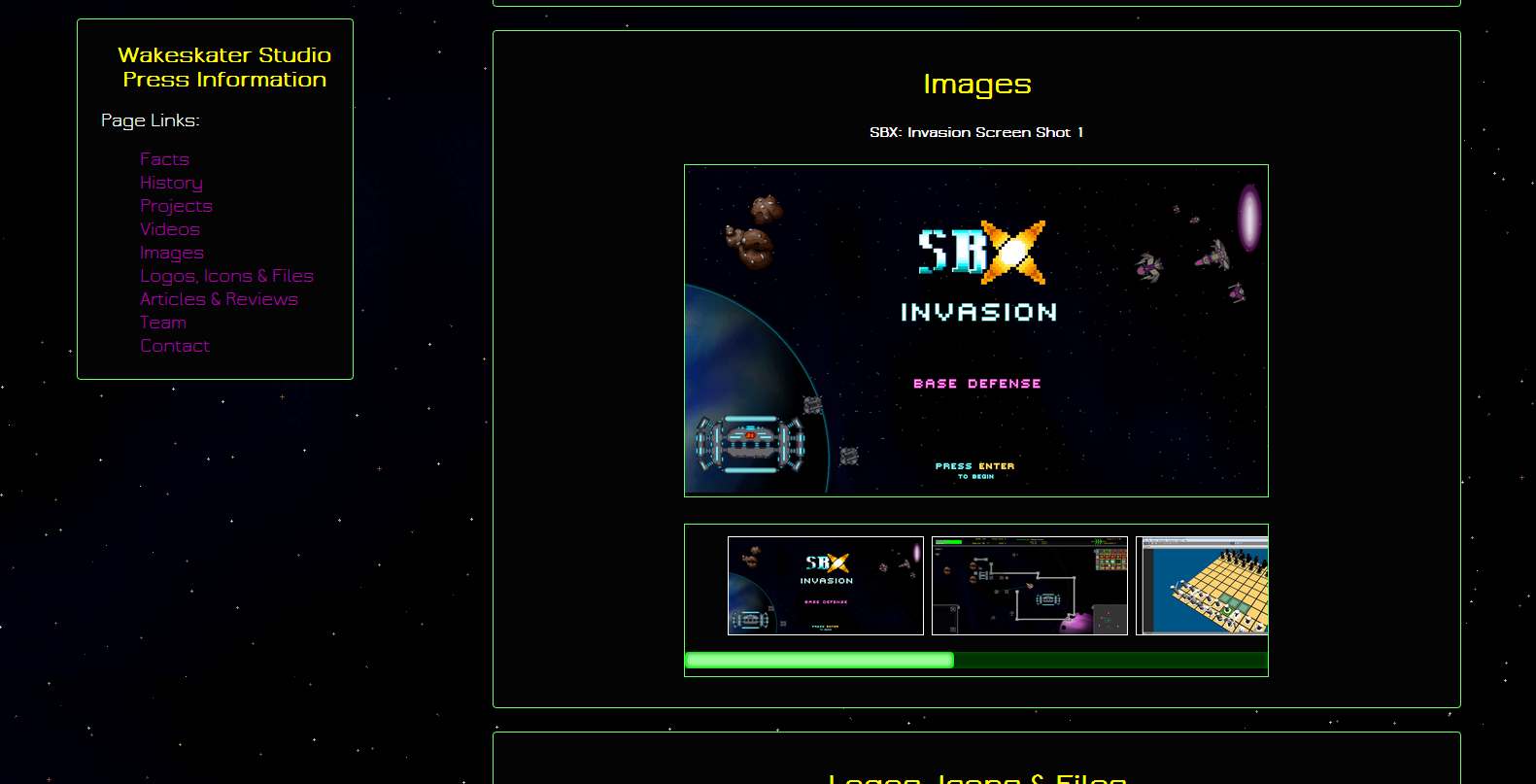
And the final thing is a custom gallery for the Press page that loads images and titles from an XML page and displays the images in a miniature gallery bar and then when they're clicked displays them and the title in the main frame.

Dynamic Loading

So for each page, I'm dynamically loading the HTML into the main "div" that holds all of the page information.  This div sits below the header and is emptied out and replaced with current page information on button click.

Here's a snippet of what the button is doing when clicked to load the Press page:


I use JQuery to load the page in and then when it finishes, I add in the functionality for the Menu Item slide panel, and the Gallery.

Sliding Menu Panel

This brings us to the next neato thing, the Sliding Menu Panel.  As you can see below in the next two screen shots the menu panel sits below the header, but as you scroll down, it locks to the top of the screen.

Sits Below Header

But Locks to the Screen as you scroll down

This isn't tremendously complicated, but it involves adding a little bit of JavaScript in order to get it working correctly.

As you can see in this snippet, I'm changing the CSS dynamically depending on the scroll location of the page.  And if my current page is not the Press page, I remove the scroll listener so it doesn't affect anything I don't want it to.


Custom Image Gallery

The final cool thing I did for this page is create a custom image gallery.  I wanted to be able to add images quickly and without touching the JavaScript or HTML and I wanted to include information with each image (such as a title), so I'm storing the image information in an XML and retrieving it when the Press page loads.

In the second screen shot above, you can see the gallery as it's loaded.  Each miniature image updates the main image frame when clicked.  (Also you'll notice I customized the scroll bar's CSS, there's a nice article on that here).  

First let's take a look at the XML structure.  It's not very complicated and you can add whatever kinds of data you want and you can use JSON if you prefer, but I think for simple things like this, XML is much easier to read.

Once I had my structure set and my XML page filled with all the titles and image locations I needed, I then wrote a simple script to load in that data (in the function loadGallery() that you saw earlier).

Here is the script, including the function I used to update the main gallery frame:


I won't go into too much detail, the script uses an AJAX get request to grab the XML and then runs through each image's data to create a list with each miniature gallery item, including an on click function to update the main gallery frame with the image when clicked.  Then I get the first image from the XML and load that into the larger frame.  Then it's just CSS to get it looking right.

These are just some little tips and tricks I thought you might find neat.  The site is coming along great, all that's left is a bit more security checks (like encrypting passwords in my database, HA!) and the Games page.

Of course the Games page will have links to pages with information about each game, so that's still quite a bit of work, but it's all relatively simple stuff.  The Press page was the big one for styling and formatting work, but it's looking alright.

Also, the website will release with a brand new game to try out!  It's a VERY rough demo, but I want to get some feedback on the game before moving further with it.

That's it for now!  I'll keep the blog updated as I finish up the website and get it up and running.

Cheers,
-Jason


Saturday, August 30, 2014

Web Security on the new website

Today I'm spending some time on implementing some web security for the website.  On my to do list (Trello is a great resource btw)  I have double checking the SQL Parameters to make sure they're parameterizing inputs properly, adding input scrubs on the server and client side to stop XSS attacks, and a few other things that I'm adding to the site.  Also I need to encrypt all my password data as well, but that's not on here yet as you can see below:


There is a lot to do for security alone, and I still need to add my press page, the games page (and all the game pages for each game, and build in an automated e-mail system.  The e-mail system I might leave until I start integrating the page into host gator but we'll see.  I might have to use their SMTP since I don't have one set up locally.

It's fun and coming along, and I'm glad I have a bit of time this weekend for labor day!  Work got off early yesterday and the Professional Services team went out kayaking Thursday and got off early as well.

It's been a pretty relaxed week, but we're about to hit the busiest time of the year, so the rest will be well used.  

That's it for now, just another small look at the website and how it's coming along. 

Cheers!

Saturday, August 23, 2014

Website Updates, RSS Link to this blog, new test game in the works.

So I've done a little bit of work to the website, namely pulling in the RSS feed from this blog and displaying the four latest posts on my blog page.

And I'm always changing up the formatting trying to find a color scheme I like for the page.  So any feedback on whether it's too cluttered or not exciting enough etc, helps.

Here's a screen shot of the blog page, pulling data directly from this blogger site.


Also I've begun working on a new browser based game.  The first iteration will launch with the new website under the games tab, and I'll probably keep the game javascript/client side (which lets you cheat super easily) for the first few iterations until I figure out if the game is fun or not before building in server side verification.

The game is going to eventually be a mobile game, and is a take on pattern recognition.  It's called Anomaly, and that's all the teaser I'll give for now, but as I get free time I'll try to finish up my website and get that info out.

That's it for now, the website is slowly coming along as I have bits of free time here and there to work on it.

Cheers!

Thursday, July 17, 2014

New Website in the Works

Well it certainly has been tough setting aside enough time to blog.  It's been the farthest thing from my mind lately!  Lot's has happened over the past few months, I've traveled, I've loved, I've lived, I've climbed mountains and well... it's pretty hard to top climbing mountains while staying moderately truthful about my past few months.

Anyway, I'm working on a new website, full with registration capabilities, some fancy JQueryUI modals, and all sorts of goodies.

It's still a LONG way out, I need to link up some MYSql Databases to store users in, build in some anti-spam functions (thinking about doing this custom, captcha is ever so annoying), and then actually add in all of the CONTENT for the website.

Right now I have the bones of it up.  It's going to use JQuery to dynamically load the html into the main page, so there's really just 1 main page that will be updated.

Here's a sneak peak at what it's looking like so far:


I'm definitely going for a sleeker look but I'll add some flair to it later and spiffy it up a bit.

Once the website is finished and up, I'll probably start working on my next game.  I'll likely just release a tower defense for android/iOS in the vein of SBX: Invasion, but that's a LONG ways out and who knows what will change in the meantime.

Anyway, I've got work in the morning so I should probably get some sleep.

Cheers!
~Jason